![logo ProovStation email.png]](https://kb.proovstation.com/hs-fs/hubfs/B2B/Logo/logo%20ProovStation%20email.png?height=40&name=logo%20ProovStation%20email.png)
1- Missions of ProovStation Customer Support
- Ensure that our clients' productions are always UP and RUNNING.
- Assist teams during installations and interventions.
- Ensure excellent customer satisfaction regarding the operational maintenance of systems.
- Set up and monitor KPIs to manage and improve the Support activity.
2- How to reach ProovStation Customer Support
ProovStation Customer Support can only be contacted by mail to support@proovstation.com.
All mails sent to this mail adress automaticcally creates ticket in our ticketing tools.
This system helps us to :
- Ensure ticket tracability
- Increase our efficiency since an agent can work on several problems at the same time
- Define and follow precise KPIs.
We do not use bots since we believe that human interractions ad skills are a key for customer experience and problem resolutions.
When a ticket is rised, a mail template available here can be used to make sure all important informations are gathered and shared to Customer Support.
To fast and ease the problem resolution, ProovStation Customer Support can then create a MS Teams meeting or MS Teams discussion for a specific topic / ticket / situation.
3- Global ticket flow
3.1- Ticket flow
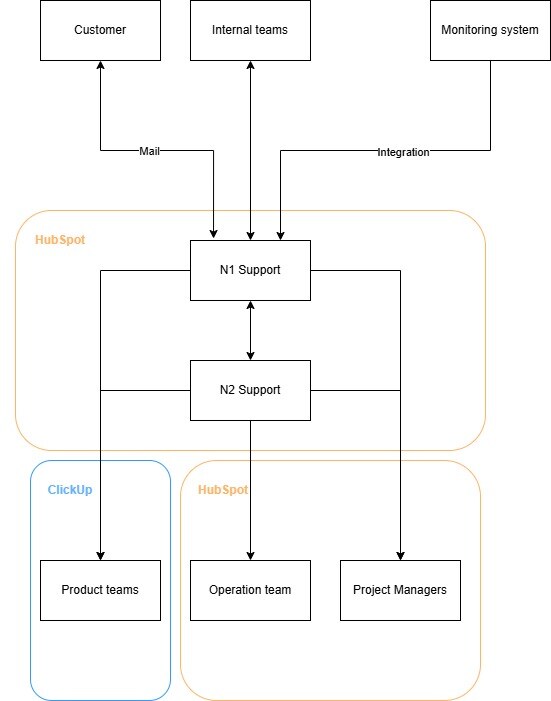
Several kind of tickets can be created to ProovStation Support :
- Internal tickets
- Monitoring alerts from our monitoring platforms
- Mails from customers
All this "triggers" create tickets in our ticket management platform (HubSpot) and are then processed by different crews :
→ N1 Support
→ N2 Support
→ Product Teams, Operation Teams and Project Managers = Experts (N3)
3.2- Proovstation teams roles in customer ticket resolution
Tickets are first processed by our N1 Support Team. The goal N1 Support agent is to :
- Be the 1st contact point when a customer opens a ticket
- Read, understand, and translate the ticket content so that it is understandable by all ProovStation teams
- Define the impact on the client's production
- Perform initial diagnostics and take first actions to attempt to resolve the client's technical issue.
- Escalate tickets to N2/N3 teams if needed.
- Communicate with the client to request additional information and keep them updated on the situation's progress.
- Monitor the status of the stations in real-time via our monitoring tools.
- Carry out regular maintenance actions.
Then, tickets can be escalated to N2 if the ticket requires deeper technical competences.
N2 is reponsible for
- Handle escalated tickets from N1 to N2.
- Perform more in-depth diagnostics and actions.
- Set up and monitor Support KPIs.
- Act as a liaison between ProovStation product teams ("Experts") and clients ("The field") regarding encountered bugs.
- Provide support during installations and interventions.
- Write technical documentation.
- Train N1 crew
If the ticket needs specfic competences to be solved, it can be escalated to "Experts" (N3 Support).
Depending the needed team, the ticket is shared in our internal ticketing tool (ClickUp)
3.3- Proovstation teams information
- Support N1
→ Located in Madagascar
→ 4 resources
→ 7 days a week :
From 7 AM to 10 PM (UTC +2) during weekdays
From 9 AM to 6 PM (UTC +2) during weekends - Support N2
→ Located in Lyon
→ 2 resources
→ 5 days a week (Monday to Friday) from 8 AM to 6 PM (UTC +1) - Product Teams = N3
→ Located in Lyon and Paris
→ Product teams / Experts + Project Managers + Intervention & Maintenance team
→ 5 days a week (Monday to Friday) from 8 AM to 6 PM (UTC +1)
4- Knowledge base
A knowledge basics gathering important information (Diag, Manipulations, Tranings...) for internal crews and customers is available here.
It contains all important informations, updated on a regular basis :
- Maintenance info
- Usual maintenance & cleaning operations
- Trainings on the use of different features ....