![logo ProovStation email.png]](https://kb.proovstation.com/hs-fs/hubfs/B2B/Logo/logo%20ProovStation%20email.png?height=40&name=logo%20ProovStation%20email.png)
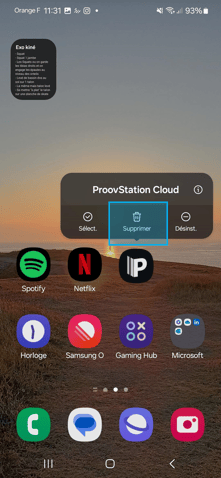
1- Remove the cloud app installed
- Stay pressed on the "ProovStation Cloud" app installed
→ App options open - Choose the Delete option to remove the app
2- Open app.proovstation.com using Chrome
- Look for Chrome app
- Open Chrome
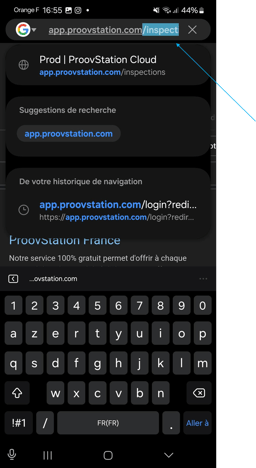
- In the search bar on the top, type in the following URL : app.proovstation.com
→ You will then access the ProovStation cloud interface
- Connect to the interface using your Microsoft credentials
You can connect to the interface only if you already have a ProovStation account (based on you Microsoft account)
3- Go in the inspection menu
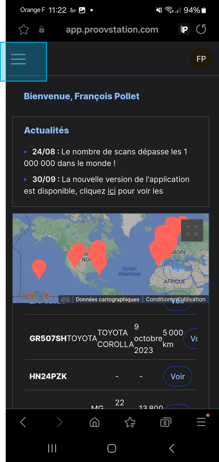
- Close the pop up window presenting the last Release note if it appears
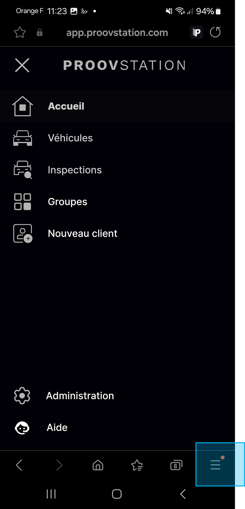
- Open the menu using the top left button
- Choose the Inspection option
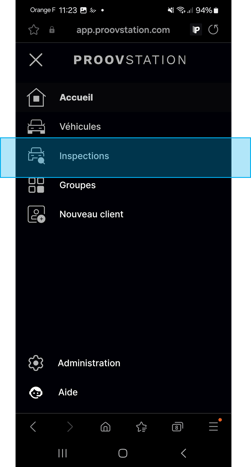
- Wait for the inspection liste to appear
→ It can takes Up to 30 s
4- Install the page as App
- Open the page menu on the bottom right corner
- Choose the option Add the page to
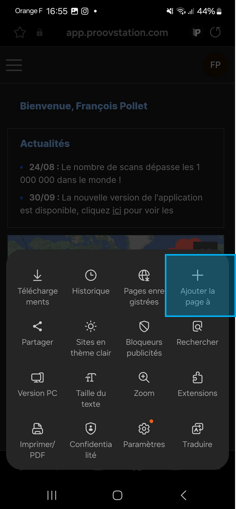
- Select Welcome page (or Desktop) to add the page as an App on the main page
→ The app is now install on your mobile main page